MCP server
How AI agents use your secrets through enveigh's MCP server — redacted by default, per-client scoped, audited, with an opt-in reveal.
enveigh-mcp is a stdio JSON-RPC MCP server that proxies to the running app's broker. It's
how Claude Code, Cursor, Codex, Windsurf, Gemini CLI, and friends use your secrets — without
the model ever receiving a plaintext value in the default configuration.
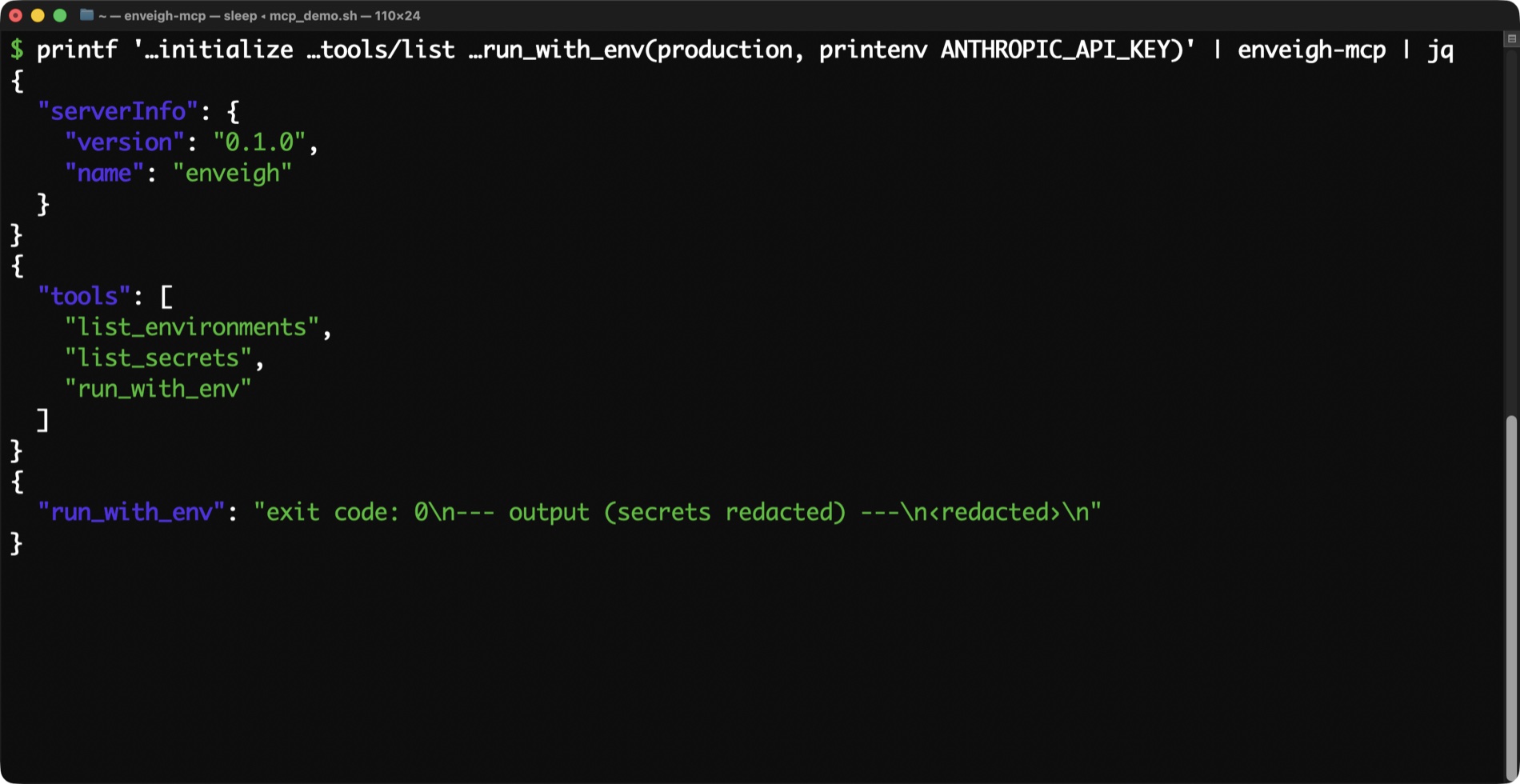
See it in motion
run_with_env and capture_secret, in a 37-second walkthrough:
Install
In the app: Settings → Integrations, then install into each detected client (or do it in one tap during onboarding). enveigh writes the MCP entry into that client's config and mints a per-client token:
{
  "mcpServers": {
    "enveigh": {
      "command": "/Users/you/Library/Application Support/enveigh/bin/enveigh-mcp",
      "env": { "ENVEIGH_MCP_TOKEN": "…minted per client…" }
    }
  }
}
Each client's token is individually revocable, and reinstalling rotates it (old configs stop working). You can scope a client to a single environment from the Integrations pane — enforced server-side by the broker, so it holds even if the client tampers with its own env.
Tools
run_with_env(environment, command) — the safe default
Runs command (an argv array) with the environment's secrets injected, and returns the
output with every secret value redacted. This is what an agent should reach for ~always.
// the agent calls:
{ "name": "run_with_env",
  "arguments": { "environment": "web", "command": ["npm", "test"] } }

// it gets back (values replaced with ‹redacted›):
// exit code: 0
// --- output (secrets redacted) ---
// > test  ·  DATABASE_URL=‹redacted›  ·  all suites passed
Output is capped (200k chars) so a runaway command can't flood the model's context.
list_environments / list_secrets
Names only. list_secrets never returns values. A client scoped to one environment only
sees that environment's bound secrets.
capture_secret(name, value) — catch a pasted key
If a user pastes a key into the chat, the agent should call this immediately. The app
shows a Touch ID confirmation ("…wants to save 'STRIPE_KEY' into your vault") — that
prompt is the user's consent. It's write-only: the agent can never read the value back.
A scoped client gets the capture bound into its environment, so the next run_with_env can
use it right away.
This pairs with the agent skill and the app's clipboard watcher to keep keys out of transcripts.
render_env(environment) / get_secret(name) — opt-in reveal
These return raw plaintext to the agent, so they're hidden by default. They appear only when the client was installed with reveal enabled:
ENVEIGH_MCP_ALLOW_REVEAL=1Even then, each call passes through the app's approval policy (Touch ID) and is audited. Tell agents not to use these unless you explicitly ask them to read a value.
What the agent can and can't do
| Default | With ALLOW_REVEAL=1 | |
|---|---|---|
| Run commands with secrets injected | ✅ redacted output | ✅ |
| List environment / secret names | ✅ | ✅ |
| Capture a pasted key (write-only) | ✅ Touch-ID confirmed | ✅ |
| Read a raw value | ❌ tool not even exposed | ⚠️ Touch-ID gated + audited |
Agent skill
Installing the agent skill (Settings → Integrations → Install the agent skill) drops a
SKILL.md into your agents' skill directories. It teaches them to:
- prefer
run_with_envover fetching raw values, - never write secret values to files, logs, or messages,
- call
capture_secretthe moment a user pastes a key, then stop using the pasted value and suggest rotating it.
Try it by hand
The server speaks line-delimited JSON-RPC on stdio, so you can drive it directly:
HELPER="$HOME/Library/Application Support/enveigh/bin/enveigh-mcp"
printf '%s\n%s\n' \
  '{"jsonrpc":"2.0","id":1,"method":"initialize"}' \
  '{"jsonrpc":"2.0","id":2,"method":"tools/list"}' | "$HELPER"
With no ENVEIGH_MCP_ALLOW_REVEAL, you'll see run_with_env, list_environments,
list_secrets, and capture_secret — and no render_env / get_secret. That's the
gate working.